
Stop retyping prompts. Build your own AI image app 💻
Take Google Nano Banana's power to the next level. Create an image generation app with 1 simple prompt.

Welcome back to Vibe Product Marketing 👋
2 weeks ago, I shared how Google’s Nano Banana model helps me cut a full workday out of my week by generating campaign-ready visuals in minutes.
The feedback on the piece was amazing. Thank you to everyone who read, shared, and commented. 🙏🏻
This week, I am taking you one step further.
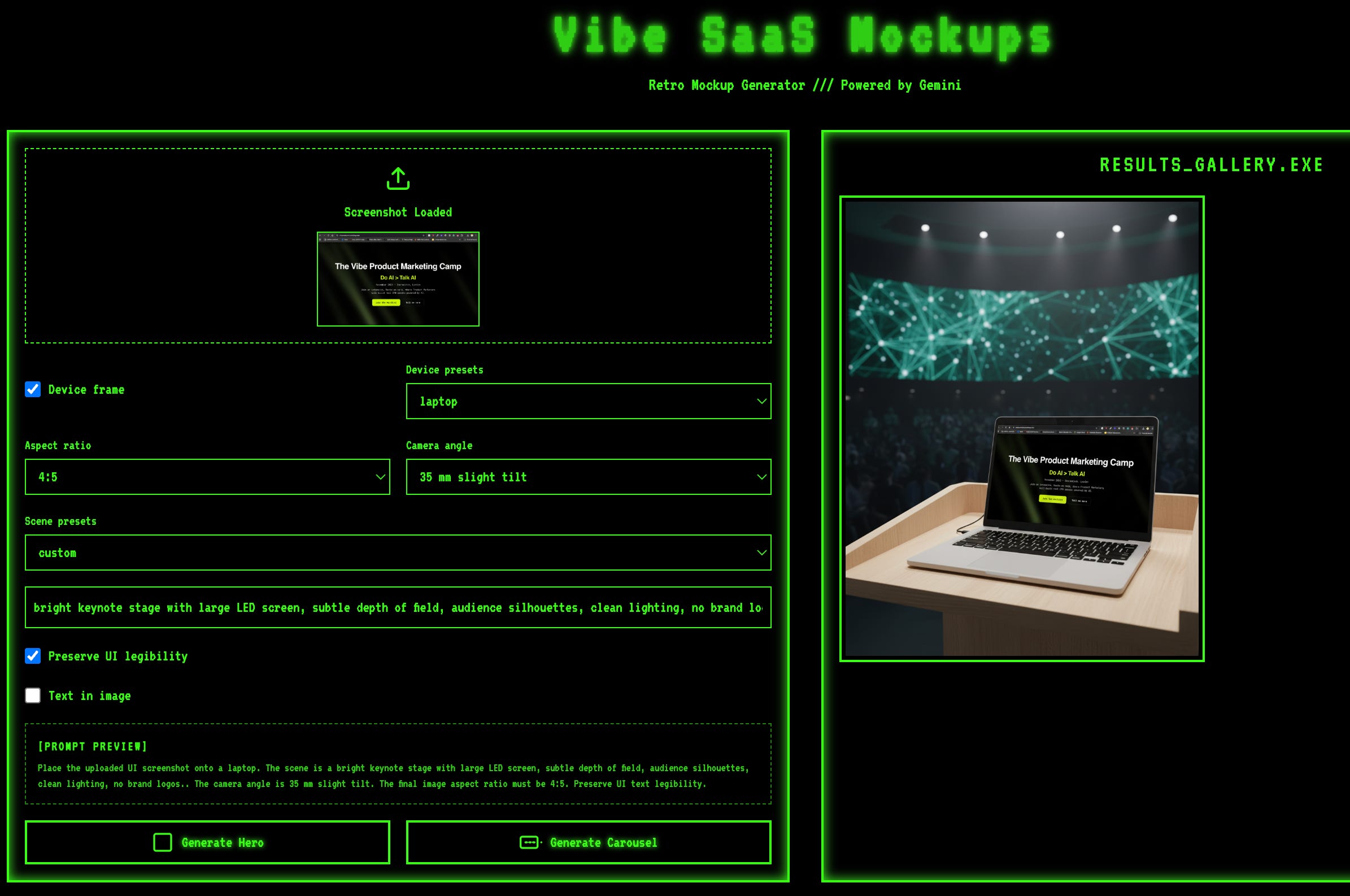
Instead of manually copying and pasting prompts and recreating the same type of assets repeatedly, I built tailored apps to create repeatable product ads and SaaS screenshot mockups.
And so can you.
Because, while prompting is fun, it can get repetitive.
Every time you want to create a new asset you need to:
upload,
Copy-paste your prompt,
Describe the context,
tweak ratios,
adjust lighting, background, effects…
Add some text.
Rinse, repeat.
It works, but it doesn’t scale.
There is a better way. You can build your own tailored image app inside Google AI Studio.
No code, no technical setup, no API keys, no cost…
Simply describe what you want, and the AI builder gets it done.
Here are two examples you can steal and start using today for your asset creation.

Wait, what’s Google AI Studio?
Think of it as Google’s playground for Gemini models. It’s a free, browser-based tool where you can:
Prompt Gemini directly (text, code, or images)
Generate and edit outputs
Use multimodal inputs to analyse videos, live screen-sharing, images, sounds…
→ Check this article on multimodal analysis for UX flows reviewsBuild small apps just by describing them
No installs, no dev environment.
You log in with your Google account, click Build, and start typing what you want.
Within seconds, you’ve got a working prototype app running in your browser.
Quick setup
Go to Google AI Studio
Log in with your Google account (free).
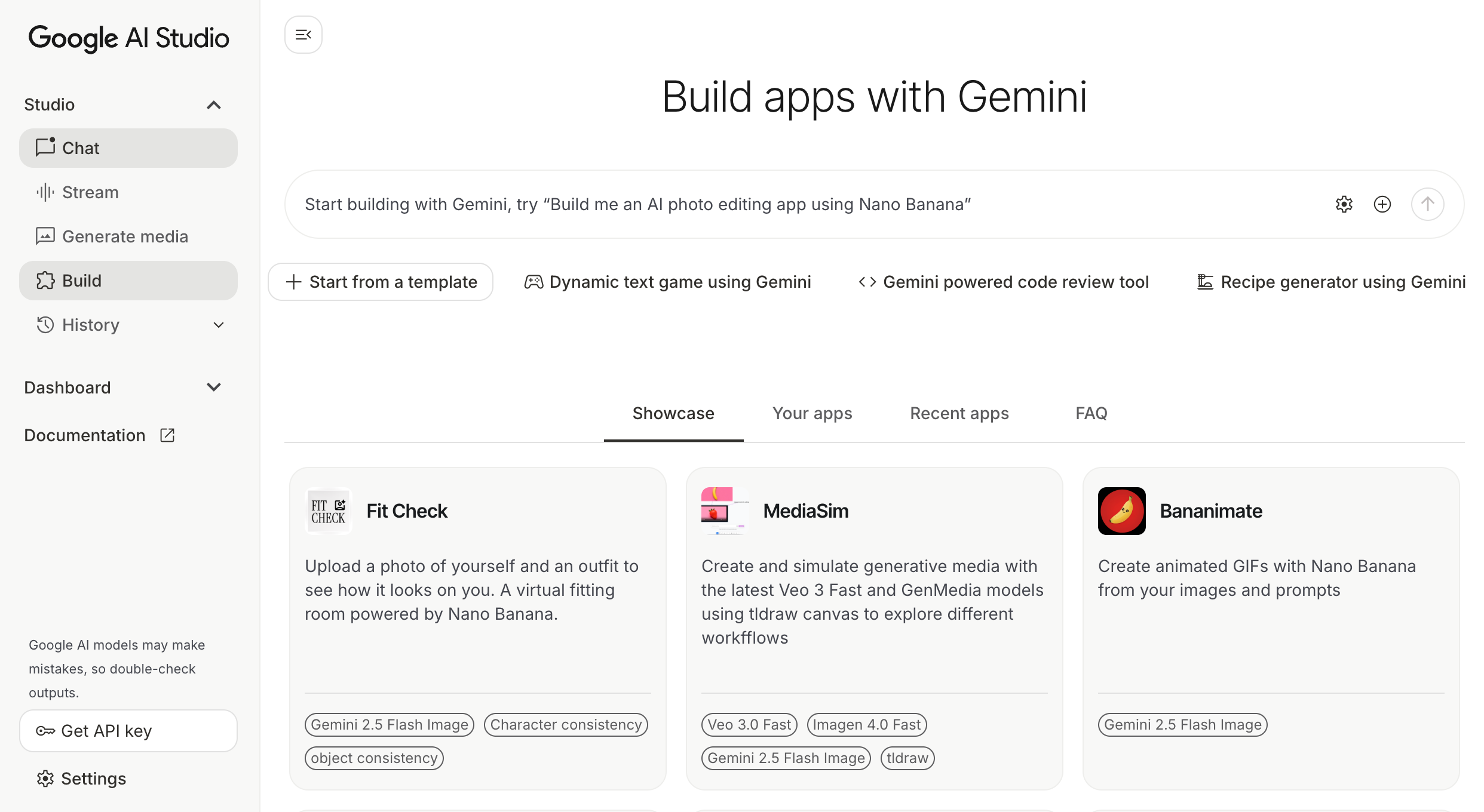
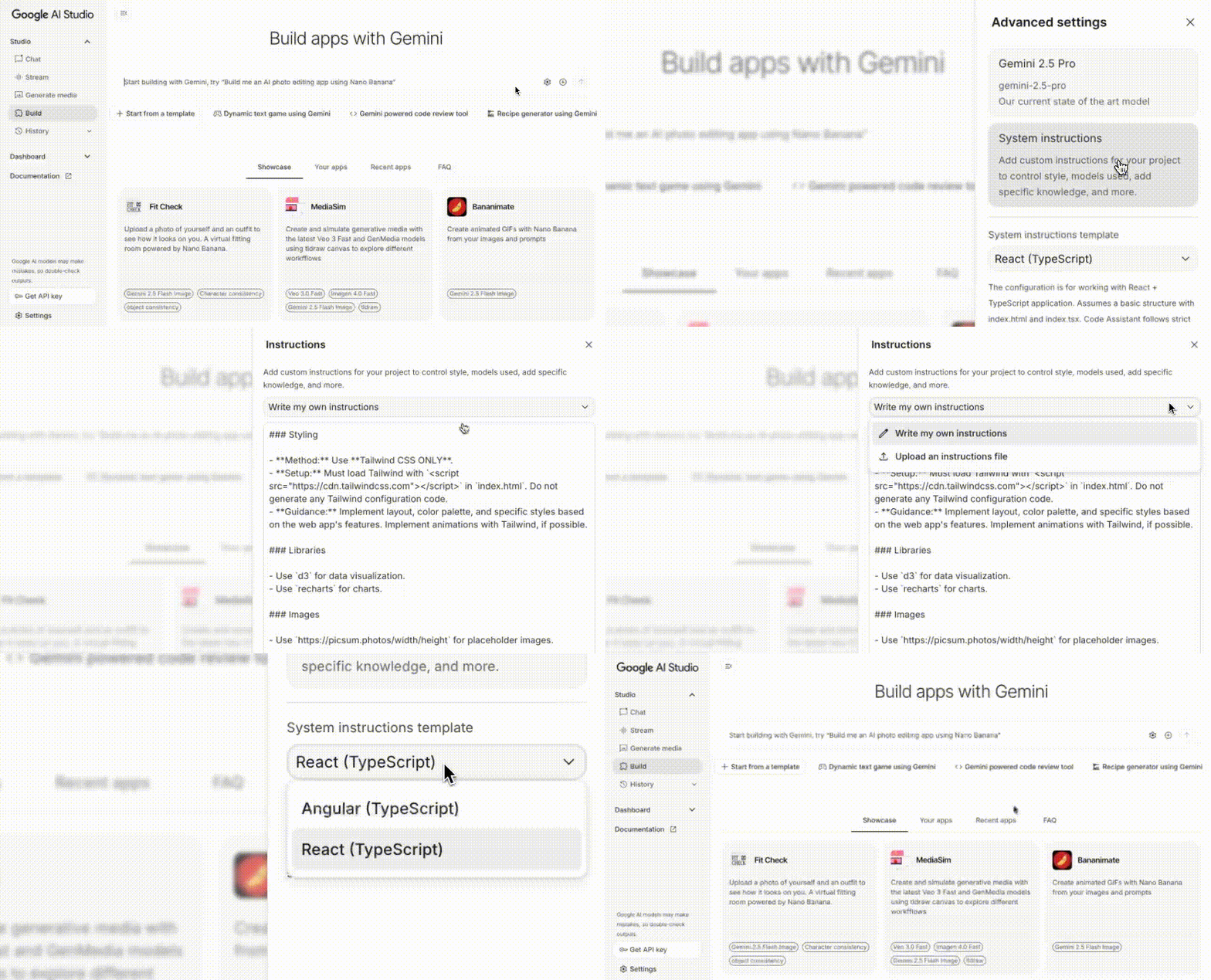
Click Build in the left-hand menu.
Prompt the app you want (as simple as: “Build me an app that uploads a product image and generates ads with Nano Banana”).
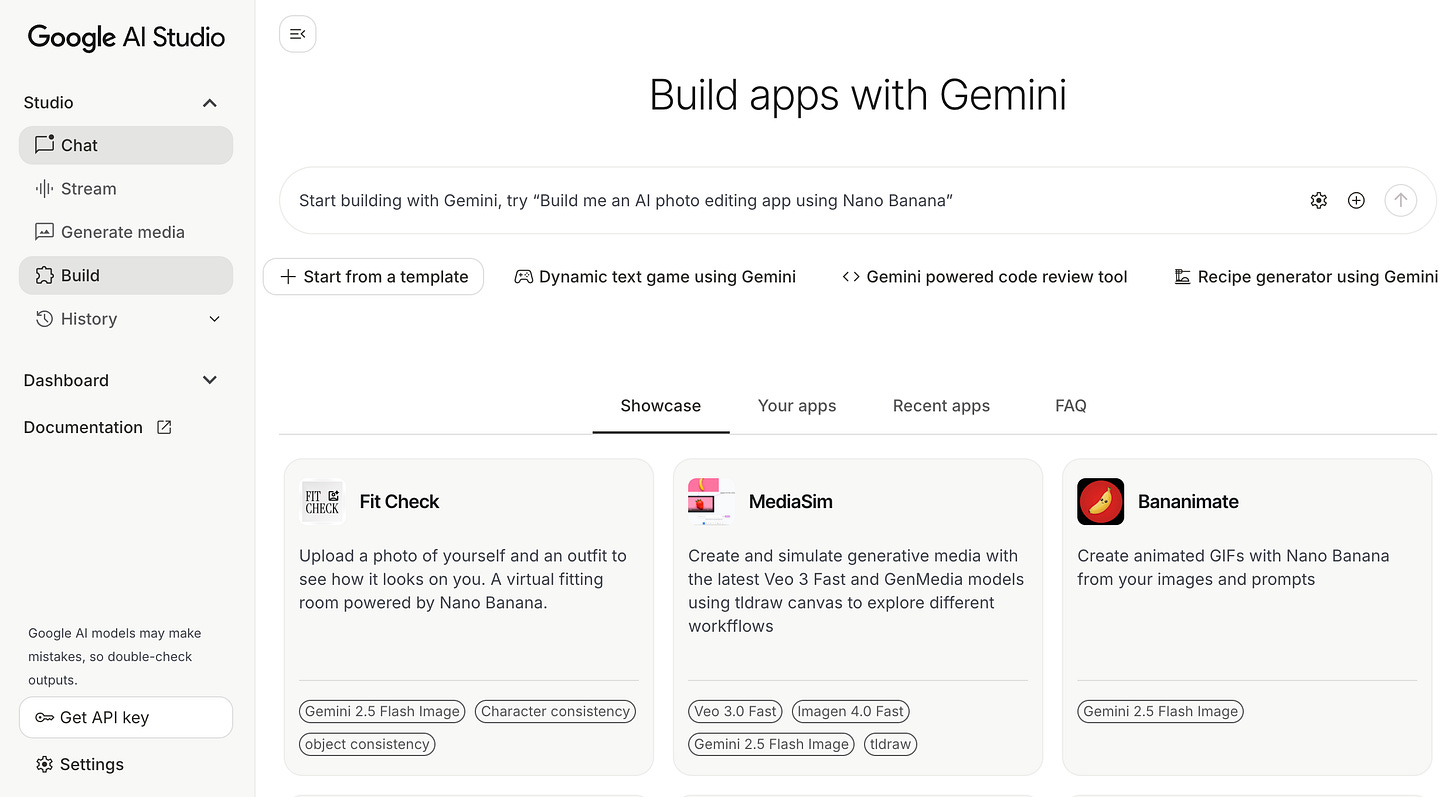
Watch it come to life, ready to use, for free.
Bonus 🎁:
You can add custom instructions to keep specific styling or guidelines.
You can choose React or Angular if you have a preference
Build a Product Ad Maker
Product marketers live in a constant cycle of mockups, ads, and campaign visuals.
Every launch, every feature, every experiment needs creative.
But design teams are often bottlenecked, and agencies don’t move at the speed of iteration.
That’s why a Product Ad Maker app becomes valuable:
You can generate professional-looking ads instantly, without waiting on design.
You can test multiple versions (ratios, lighting, taglines) before handing the best direction to a designer.
You keep consistency across campaigns by controlling variables like ratio and brand text.
Instead of opening Figma or briefing design every time, you just upload, tweak, and export.
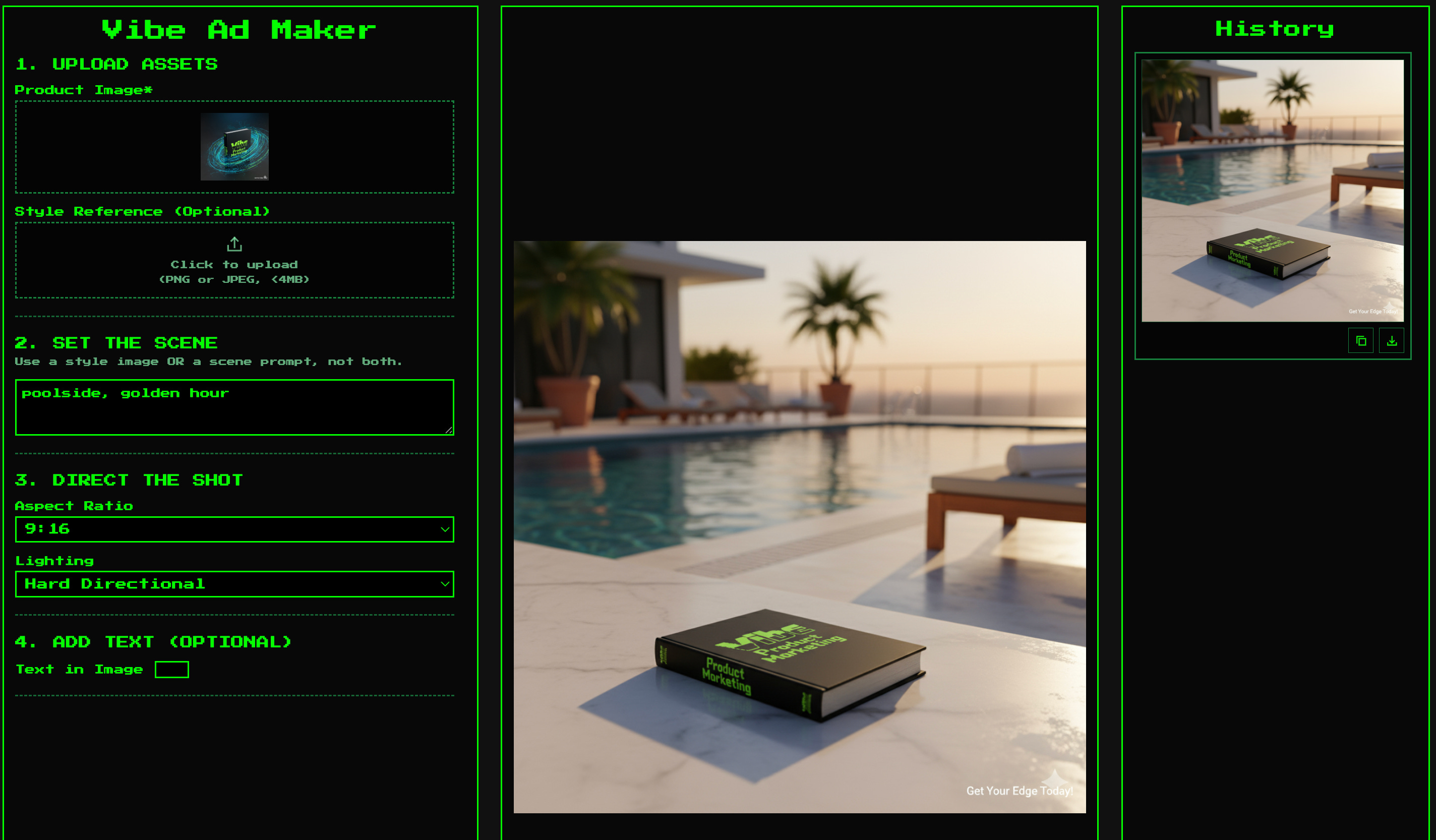
Upload your product image.
Add either a quick scene prompt or a style reference.
Then pick your ratio, lighting, and if you want, add a tagline that’s rendered directly into the ad.
Then comes a polished, on-brand product visual in seconds.
Below you’ll find the prompt I used to create this app.
PROMPT:
Build a single-page web app that uses Gemini 2.5 Flash Image for product ads.
UI
- Upload: "Product image" (PNG with transparency preferred, JPEG allowed)
- Optional: "Style reference" image
- Optional: "Scene prompt" text area (if no style reference, use this)

Controls:
  • Aspect ratio: 1:1, 4:5, 9:16, 16:9
  • Lighting: soft studio, hard directional, moody backlight, daylight window
  • Text in image: toggle
      - Tagline text input
      - Placement: top-left, top-center, top-right, center, bottom-left, bottom-center, bottom-right
      - Style presets: clean sans, elegant serif, bold condensed
      - Color: auto-contrast on background or custom HEX
- Actions: Generate Ad, Generate 3 Variations, Edit Last Image
- Right pane: history gallery with prompt preview, download, copy prompt

Behavior
- If style reference is provided, analyse composition, palette, textures, and typography cues and infuse that look.
- If scene prompt is provided, synthesise a detailed art direction: environment, camera angle, depth of field, reflections, surface shadows, and colour harmony.
- Before calling the model, enforce the selected aspect ratio on the canvas.
- Composite rules:
  • Place the product naturally with perspective-correct grounding, soft contact shadow, and optional subtle reflection.
  • Keep product edges crisp and colour-accurate. Do not distort logos.
  • If "Text in image" is ON, render the tagline with legible contrast and safe margins.

- Editing flow: "Edit Last Image" accepts natural language changes, then re-renders.
This app allows me to test many different product ad ideas, taglines, and contexts.

What do you think of the results?
SaaS Screenshot maker
All the AI-generated product ads are great, but for many Product Marketers working on software, they aren’t really relevant.
For PMMs in SaaS, screenshots are your product ad.
They’re the proof, the hook, and often the first impression in ads, decks, or landing pages.
But raw screenshots rarely sell the story; they look flat, cluttered, or out of context.
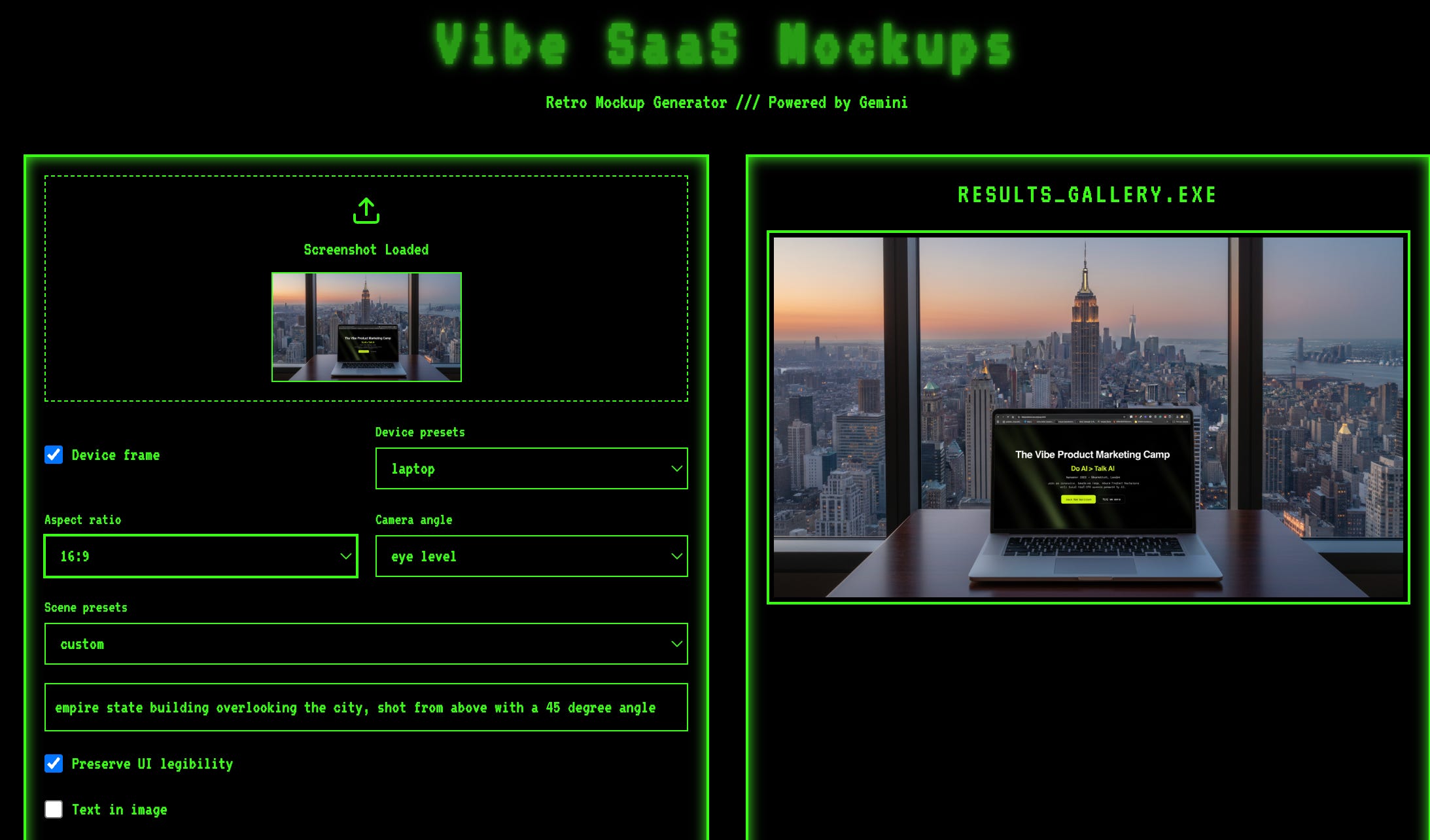
Now, with this kind of self-made tailored app:
You can instantly wrap your UI in a polished laptop or phone mockup.
You can place it in realistic environments (keynote stage, founder desk, trade show booth) that match your campaign narrative.
You can test hero images or ad variations before shipping them to design or creative.
Instead of spending hours Photoshopping mockups or waiting for design, you generate pro-level visuals with a click and focus your time on messaging.
Upload a raw UI screenshot and let the app place it into a device frame (laptop, phone, tablet)
and drop it into a photoreal scene: a keynote stage, a founder desk, even a trade show booth.
You can also overlay a tagline for ad-like polish.
Paste this into the builder:
Create a web app for SaaS mockups with Gemini 2.5 Flash Image.
UI:
- Upload "UI screenshot".
- Optional "Device frame" toggle with presets: laptop, phone, tablet.
- Controls: Aspect ratio (4:5 default), Scene presets dropdown (founder desk, boardroom, café table, trade show booth), Text box for custom scene, Camera angle (eye level or 35 mm slight tilt), "Preserve UI legibility" checkbox.
- Optional: Text in image toggle with tagline input, placement, font, and colour.
- Buttons: Generate hero, Generate carousel (3 variants), Edit.
- Left column: Prompt preview; Right column: results gallery with download.

Behavior:
- Place the screenshot on the chosen device with perspective-correct, edge-to-edge rendering.
- Preserve brand colours and typography from the screenshot.
- For "carousel", create 3 variations with consistent device/UI but different backgrounds/lighting.
- Enforce aspect ratio before generation.
- If "Text in image" is enabled, overlay tagline with proper contrast and safe margins.
Once your app is done, you can publish it and make it accessible (for free) on Google Cloud.
Or share it with via a link (accessible to Google Account owners).
Some Tips I learned the hard way
After many iterations, here a few tips that will save you time in the process:
You always need to force aspect ratios
→ otherwise, everything defaults to the source’s image ratio.Give guardrails (optional)
→ Define brand guidelines or specific rules to apply across your projectSave your app as you go.
→ There is no auto-save, so your edits might go to waste if you are not careful!
And that’s a Wrap!
In the first article, we saw how Nano Banana can cut hours out of your week just by prompting smarter.
This week’s step-up is about making those workflows repeatable.
Instead of retyping prompts, you now have your own mini-apps to generate product ads or SaaS hero images in one click.
Execution is cheap. Creativity is your moat.
🙋🏻 Build your own tailored image PMM apps, and please send us your best one.
We will feature your app in the next edition.
Cheers,
✌🏻 Toni
PS: If you enjoyed this tip, feel free to share it. It will help us grow the community.
